For agencies
Submit candidates to jobs
Put your candidates forward for an employer's job and track approval.
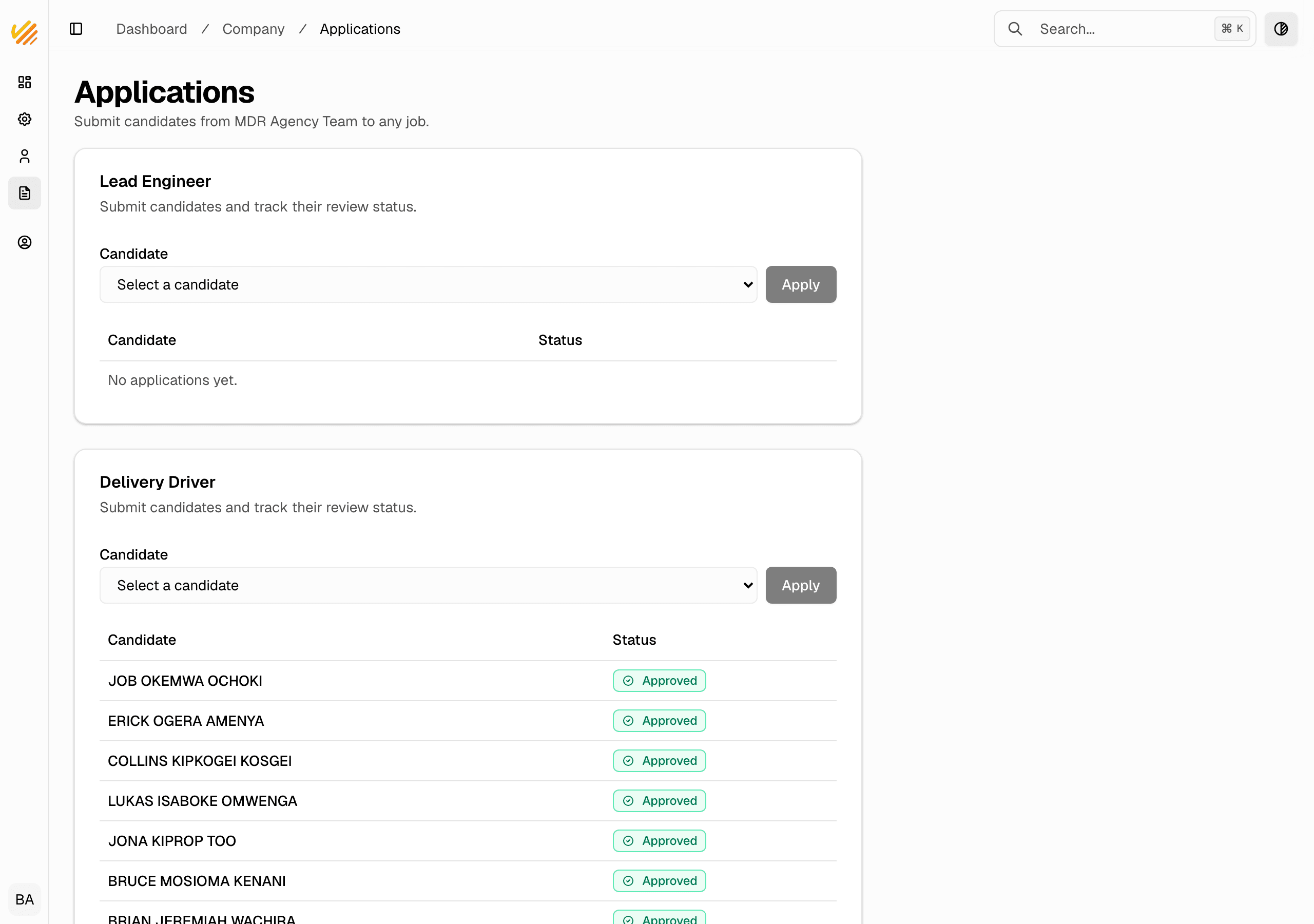
When an employer shares an approved job with your agency, you can submit your candidates to it from the Applications page. Your submission waits for an admin to approve it before the employer can see the candidate.
See the jobs open to you
- In the company dashboard, go to Applications.
- You see each job an employer has shared with your agency, as its own card.
- Each card shows the candidates you have already submitted and their status.
Submit a candidate
- On the job's card, open the Candidate dropdown and pick the person you want to put forward.
- Click Apply.
- The candidate's status becomes pending approval — hidden from the employer until an admin approves.
What the statuses mean
- Eligible — the system matched the candidate to the job automatically.
- Pending approval — you submitted the candidate; an admin has not approved yet. The employer cannot see them.
- Approved — an admin approved the submission; the employer now sees the candidate at the top of the list.
Notes
- You can submit any candidate to a job, even one the system did not match. It simply waits for admin approval.
- Submitting a candidate the employer can already see does nothing — it never hides or downgrades them.
- Each agency sees only its own applicants on a shared job. You never see another agency's candidates.