Put candidates forward
Show your eligible candidates to the employer of a job open to your agency, and withdraw them when you need to.
When MHive approves a job, it opens it to agencies: to every agency, or only to the agencies it picks. On a job open to your agency, MHive works out which of your candidates fit it. Those are eligible: only your agency and MHive see them. The employer sees a candidate only once you put them forward.
Open a job open to you
-
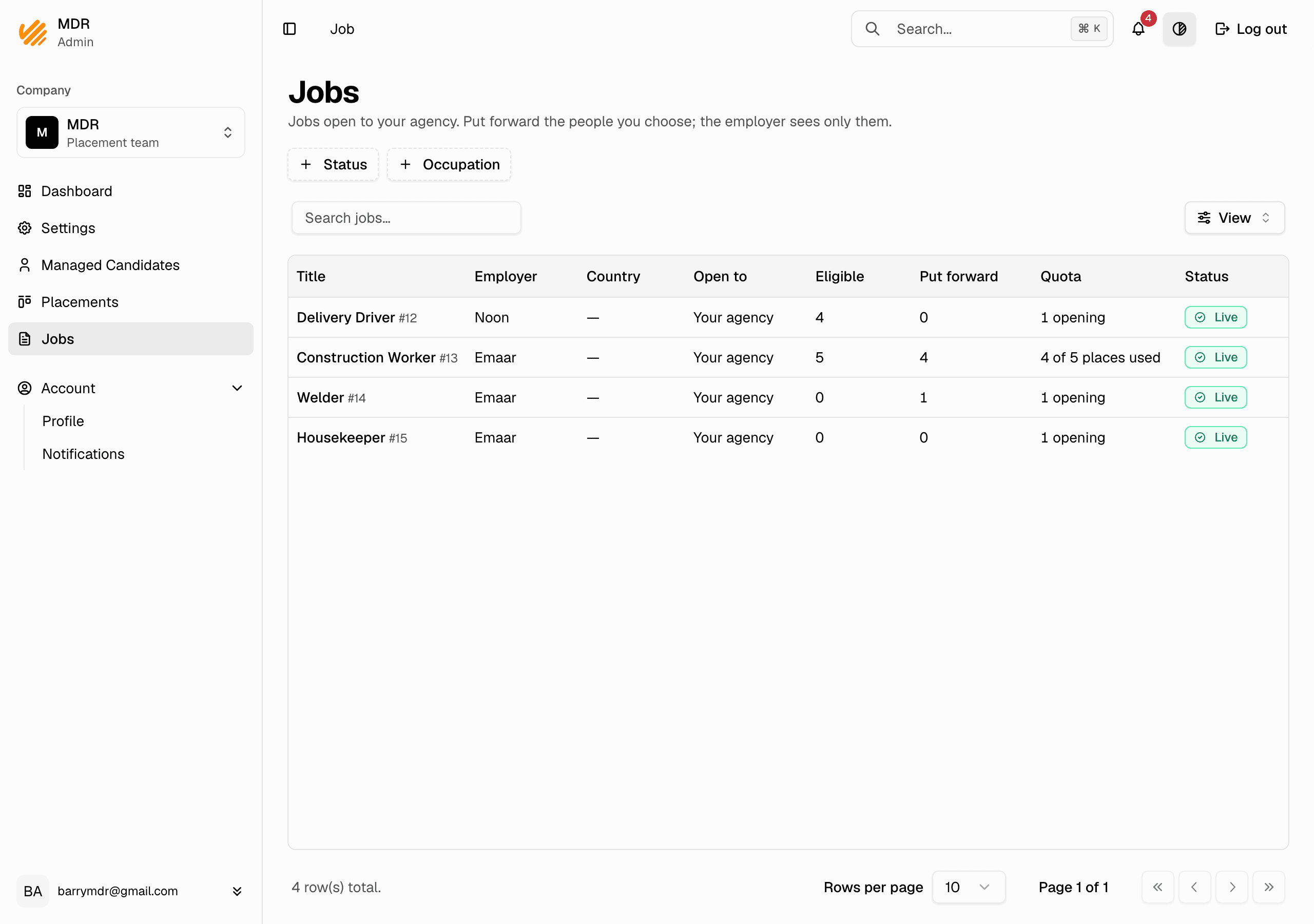
In the company dashboard, go to Jobs. The list shows the jobs open to your agency, and the jobs your candidates are on. Open to says Every agency or Your agency.
-
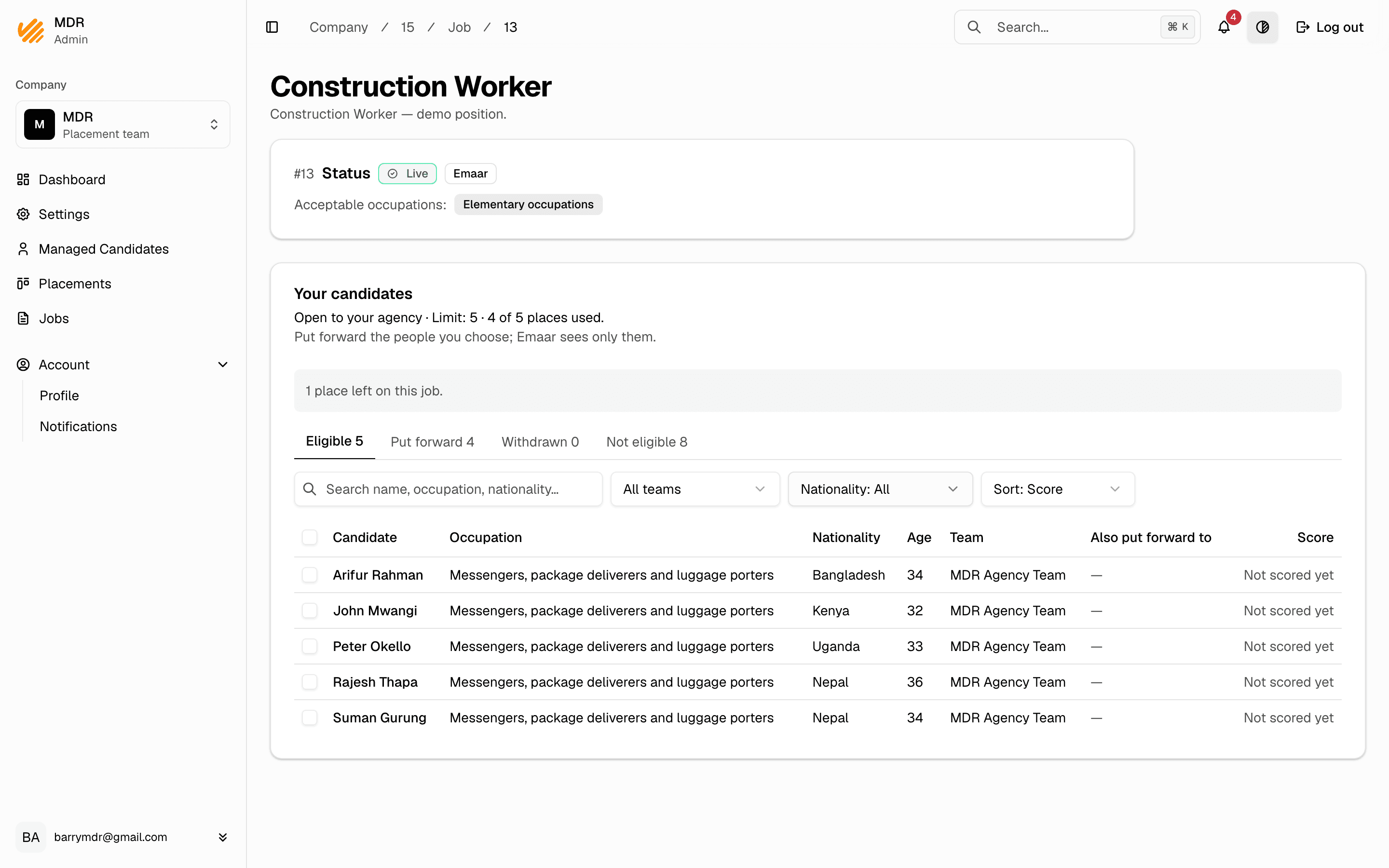
Open a job. Your candidates are in four tabs:
- Eligible — they fit the job. Only you and MHive see them.
- Put forward — the employer sees them, with the step they reached.
- Withdrawn — taken back, with who did it, when and why.
- Not eligible — they do not fit, with every reason and where to fix it (for example Edit countries or Edit occupations).
Your quota on a job
Each job shows you one quota, in the Quota column of the Jobs list:
- Your limit, if MHive gave your agency one on the job: the most candidates you can have put forward there. Hired candidates count; a withdrawn one frees a place. The list says 4 of 5 places used, and the job says Open to your agency · Limit: 5 · 4 of 5 places used.
- The job's openings otherwise: how many people the employer wants to hire, for example 3 openings.
With a limit:
- Ticking stops at the places you have left.
- When you have used every place, the job says Your agency uses all 5 of its places on this job. To put someone else forward, withdraw someone who is not hired.
- If someone else in your agency used places while you were choosing, Nothing was put forward says how many places are left.
Other agencies on the job are never shown to you, and neither are their limits.
Put candidates forward
- On Eligible, tick the candidates you want to show to the employer.
- Click Put forward. The window names each of them and what the employer will see.
- Confirm. The employer is told and sees their profiles — never their passport numbers.
MHive checks again at that moment: if someone no longer fits, nothing is put forward and the window says why.
Withdraw a candidate
- On Put forward, tick the candidates to take back.
- Click Withdraw and pick a reason: No longer available, Put forward by mistake, or Other with a note.
- Confirm. The employer sees only a line saying they were withdrawn, by whom, when and at which step — never your note.
A hired candidate is never withdrawn. A withdrawn candidate who still fits can be put forward again; the hiring steps start over.
Notes
- Only the people on one of the candidate's agency teams can put them forward or withdraw them.
- A candidate who stops fitting a job is withdrawn by MHive, as No longer eligible.
- If MHive removes your agency from a job, your candidates not yet hired are withdrawn with the reason The agency was removed from this job. You can still follow and withdraw your candidates on it.
- Each agency sees only its own candidates on a job.